Coffi Marketplace is Live

Changelog


2.1.0 - The new scanner

Builds 2726-273130 changes

Coffi 2.1 brings a faster scanner, two Friends feeds, a podium leaderboard, new brew methods and multi-select.

The new scanner answers faster and finds the exact coffee more often. When a coffee isn't in Coffi yet, it says so instead of guessing.

Friends now has two feeds to swipe between: For you, from across Coffi, and Following, from the people you follow. The leaderboard puts the top three on a podium, with a crown for first place.

Recipes can now be cold brew or moka pot, with more control over every pour. And you can select many coffees, collections, gear or recipes at once and act on them together.

  • Select multiple coffees: Save, archive, finish or delete many coffees at once.
  • Bulk freezer moves:
    Pro
    Advanced mode Move a stack of bags to the freezer, or finish or delete them together.
  • Bag levels:
    Pro
    Advanced mode Set how much coffee is left, see it on every bag, and finish empty ones.
  • Sort by bag level: Sort My Coffees by how much is left in each bag.
  • Sort by roast date:
    Pro
    Sort coffees by their freshest bag, newest or oldest first.
  • Counts on filters: Filters show their totals before you tap.
  • Imperial bag sizes: Advanced mode Bag sizes come in ounces and pounds when you use Imperial weights.
  • Edit your added coffees: Update the details of coffees you added yourself.

  • Scan timer and breakdown: Watch a live timer while you scan, then see where the time went.
  • Scan history shortcuts: Press and hold a past scan for quick actions, even when it didn't match.

  • Weekly leaders: See the week's top three at the top of For you.
  • Who to follow: Discover suggested people and follow them in one tap.
  • Recipes to try: Find other people's recent public recipes right in your feed.

The welcome screen's sign-in
  • Podium time filters: Switch the podium between all time, the last 7 days and the last 30 days.

  • Country viewer: Pick an origin to fly there, with the country outlined and only its coffees shown.
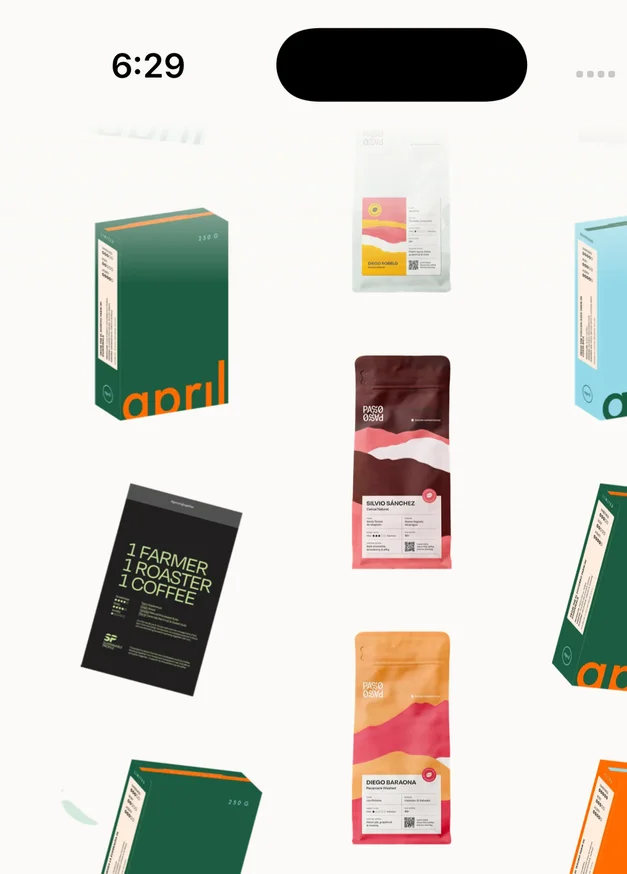
The welcome screen, up close
  • Switch and Clever valve control: Close the valve on any pour and choose when it opens.
  • Recent pour plans: Pick from your recently used pour schedules when building a recipe.
  • Attach coffees to recipes: Link coffees to a recipe so it shows what it has brewed.
  • Private recipe notes: Keep private notes on your recipes, even when the recipe is public.
  • Version changes view:
    Pro
    Compare recipe versions to see exactly what changed.
  • Section explainers: Tap the question mark on any recipe section to learn what its settings do.

  • Gear previews: Read about anyone's gear before adding it, including custom gear they made.
  • Bulk public or private: Make your whole gear shelf public or private in one go.

  • Full country names: Origins show in full, even when a roaster only names the continent.

  • Separate temperature unit: Choose Celsius or Fahrenheit separately from your weight units.

  • Shipping in your currency: See shipping costs in your own currency at live exchange rates.

  • Home Screen quick actions: iPhone Press and hold the app icon to scan or search coffees.

  • Notifications reach your new account after switching accounts on the same phone.
  • On Android 15 and later, labels no longer lose their last word.
  • Every bag size a roaster sells now shows correctly in the cart and can be bought.
2.0.0 - Coffi 2.0

Builds 2701-272444 changes

Coffi rebuilt from the ground up, adding brew recipes, your gear, Advanced mode for every bag, and a Passport on a real map.

Brew recipes let you dial in and save a recipe for any coffee, and Pro members keep a version history of every change. Add your grinders, brewers, machines and filters to your gear, and each recipe remembers what you used.

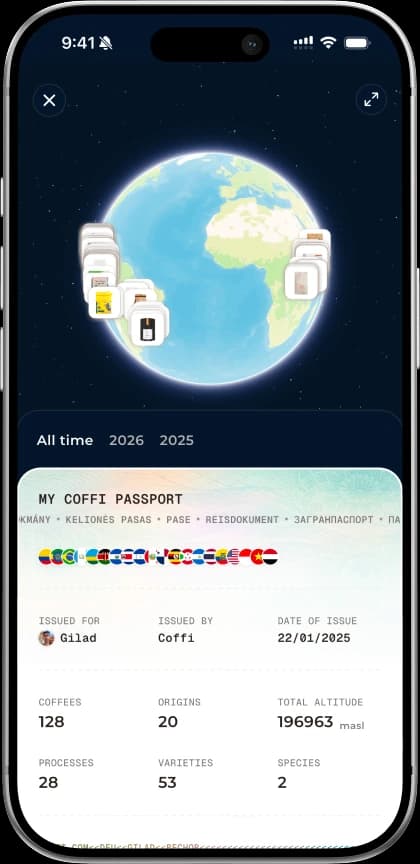
With Coffi Pro, Advanced mode makes every bag in My Coffees its own record, with its own freezer, resting and notes. The Passport now flies a real globe to any coffee, with search across your origins and a choice of map styles.

Everything looks new, too: a fresh splash, a glass sign-in, press-and-hold menus and a redesigned My Coffees.

  • Brew recipe library: Keep your pour over and espresso recipes in My Coffees, in any order you like.
  • Every brew parameter: Set dose, water, temperature, grind and timing, with ratios worked out for you.
  • Pour plans: Plan timed pours yourself or start from well-known recipes scaled to your dose.
  • Share and reuse recipes: Share recipes as images, attach them to reviews, and save others' with credit.
  • Version history:
    Pro
    Save new versions of a recipe and restore any earlier one.

  • Gear library: Keep your grinders, machines, brewers and filters in My Coffees, with search and filters.
  • Add gear your way: Add several catalogue items at once, or create your own when something is missing.
  • Machine and grinder settings: Save your settings and pull them straight into new recipes.
  • Defaults, notes and retiring: Set default gear, add notes with photos, and retire gear you no longer use.
  • Gear and recipes, linked: Recipes save the gear they were brewed with, and each gear page lists them.

  • A new My Coffees tab: Replaces Track, bringing your coffee wall, recipes and gear together.
  • Sort and filter your coffees: Sort your collection and filter by roaster, origin, flavour profile and your own data.
  • Resting periods: Set resting periods quickly and add them to Apple or Google Calendar.
  • Advanced mode:
    Pro
    Track each bag as its own record with size, roast date, price and source.
  • Freezer, tags and history: Freeze and tag bags, link notes to them, and follow every change in a timeline.

  • Apple Maps globe: iOS Explore your origins on a 3D globe in Satellite, Dark, Light or Muted.
  • Passport over the map: iOS Drag the Passport up and down over the globe, or hide it entirely.
  • Search your coffees on the map: iOS Find any coffee by name or roaster and fly the globe straight there.
  • Smarter pins: Tap a pin to open its coffee, and nearby coffees fan out instead of stacking.
  • Coffee heatmap:
    Pro
    iOS Shade each origin country by its share of your coffees.

  • A rebuilt app that updates in place: Installs over 1.6 as a normal update, keeping you signed in and your drafts.
  • Liquid Glass: iOS 26 Floating buttons and controls are Liquid Glass, with a frosted look on older iOS.

  • New welcome and sign-up: A fresh welcome screen, easier code entry, and swiping back through each step.

  • Discover and search: Verified roasters move up on Discover, and recent searches only save what you opened.

  • Track is now Add: Rate, note and track from the new Add button, and read every review on one page.

  • Roaster updates: Get notified about a roaster's new releases, or shop all their coffees in one tap.
  • Roaster locations on Apple Maps: iOS See verified roaster locations on a full-screen map and get directions.

  • Press-and-hold previews: iOS Hold a coffee, roaster, person or collection to preview it and act right away.

  • Rebuilt scanner: A new camera screen, and you can add a matched coffee straight from the result.

  • More from every review: Open feed reviews with their comments, and share, edit or report any review from its menu.

  • New collection button:
    Pro
    Start new collections from a floating button; your first one is still free.

  • Recipes and Gear on profiles: Public recipes and gear show on your profile, and visitors can save them.

  • Report, block and remove: Report or block people, manage blocked users, and remove unwanted followers.
  • Ambassador ring and tag: Coffi ambassadors stand out on their profile, with a way for you to apply.

  • Clearer questionnaire: Answer with named scale levels and pick origins, varieties and processes from one sheet.

  • Better sorting and filters: Sort in either direction and filter by where roasters ship from and shipping price.

  • Mark as delivered: Mark an order delivered yourself when its tracking never updates.

  • Referrals on Android: Referrals are now in Settings on Android, and the app runs lighter there.

  • Works better offline: Screens wait while you're offline and reload once you're back.
  • Faster fixes: Many fixes can now arrive as small updates, without an App Store release.

  • Saving a shared review or Passport image no longer crashes the app.
  • Replying to a comment keeps what you typed and places the mention correctly.
  • Private profiles can no longer be followed.
  • Roaster locations no longer crash the app when they fail to load.

1.6.4 - Patch release

Builds 2591-26054 changes

The last release before Coffi 2.0, adding a Taste digest screen and a stricter Taste Match badge.

  • Taste digest: Open the weekly Taste Match notification to browse, filter and sort the coffees it picked.
  • Digest at a glance: The weekly digest notification now previews its coffees in a collage.

  • Stricter green badge: A green Taste Match badge now means a score of 80 or more.

  • The "Taste Match is now free" questionnaire opened for people who already had a taste profile.

1.6.3 - Taste Match for everyone

Builds 2576-258811 changes

Taste Match is now free for everyone, and a short questionnaire sets up your taste profile right away.

Everyone now gets unlimited Taste Match scores and recommendations, with no Pro needed. And you don't have to rate anything first: answer a few questions in the Taste Questionnaire and Taste Match is set up right away.

  • Start anywhere: Open the questionnaire from Discover or your score breakdown, and resume a saved draft.
  • Match with every friend: Compare Taste Match with all your friends, not only Pro friends.
  • Weekly picks for all: Weekly picks are no longer Pro-only.

  • Taste match sort for all: Anyone can now sort the shop by Taste Match.

  • Scores unlocked: Taste Match scores and the "For your taste" row are open to everyone.

  • Redesigned feed: The notifications feed is clearer, with a settings toggle for each new type.
  • Roasters on the marketplace: Hear about roasters new to the shop and browse their coffees in one tap.
  • Weekly taste match: Every Monday, see coffees that match your taste and ship to you.
  • Vouchers & offers: Discount codes arrive as notifications you can copy with a tap.

  • Images in non-square slots looked stretched.
  • After switching accounts, Taste Match badges could show the previous account's scores.

1.6.2 - Rate every brew

Builds 2495-256811 changes

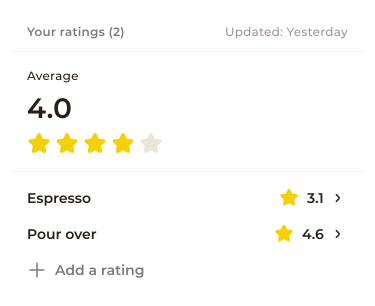
Your ratings for a coffee: a 4.0 average from an espresso and a pour over

Rate a coffee once per brew, see shipping costs before checkout and follow active orders on your profile.

Each brew of a coffee can now have its own rating, and you see your average across them. Reviews in the feed show how the coffee was brewed.

Your cart shows shipping costs before checkout, broken down by roaster, and orders on their way sit at the top of your profile with their live status. Taste Match also moves to a refined matching algorithm.

  • Brewing method on ratings: Add an optional brewing method, hot or iced, to any rating.
  • All your ratings: See every rating of a coffee in one list and add another.

  • Order links open the app: Order emails now open your order directly in Coffi.

  • Sort by price per weight: Sort the shop by price per kg or per lb.

  • coffi.com links: Shared links now use coffi.com and open straight in the app, including on iOS.

  • Banners while the app is open: Pushes now show as system banners even when Coffi is open.

  • New toasts: Messages stack, can be swiped away and expand to show long text.
  • Lighter on older phones: Coffi runs lighter, especially on mid-range Android phones.

  • The last cart item was hidden behind a tall checkout drawer.
  • Clearing an existing rating's brewing method didn't save.
  • The coffee page stayed dimmed after adding a rating from My Coffee.

1.6.1 - Patch release

Builds 2464-24888 changes

A shipping-focused shop update with one synced cart and shipping costs shown up front.

  • One cart everywhere: Your cart now syncs across the app, coffi.com and your other devices.
  • Free-shipping progress: Each roaster in your cart shows how much more unlocks free shipping.

  • Roasted in your country: A new Discover row features coffees from roasters in your ship-to country.
  • Shipping costs up front: Coffee pages show shipping prices and free-shipping thresholds per country.

  • Country pre-filled: Sign-up suggests your country from your device region.

  • Coffees on Discover carousels appeared and then vanished a second later.
  • Coffee pages could advertise free shipping to countries that actually cost money.
  • A typo in a roaster's coffee search emptied the list until filters were reset.

1.6.0 - The marketplace

Builds 2256-246124 changes

Coffi becomes a place to buy coffee, with an in-app shop, order tracking and a rebuilt Discover.

Buy coffee from verified roasters in a single cart without leaving Coffi, then follow every order and shipment from Settings. Sold-out coffees can send you a push when they're back in stock, and checking out takes one step.

Discover is reimagined, with fast search across coffees, roasters and users that forgives typos. Roasters can now be saved to the same collections as your coffees, and Taste Match shows how well a coffee suits each of your friends.

  • Shop coffees: Browse every coffee for sale, with price, stock, search, filters and sorting.
  • Ship to your country: Choose where coffee ships, and the shop shows what can reach you first.

  • Buy from the coffee page: Buy, bookmark or track a coffee, and check stock and shipping before you order.
  • Choose size and grind: Pick weight, grind and quantity before adding a coffee to your cart.

  • One cart, many roasters: Collect coffees from several roasters in one cart, reachable from every main tab.
  • Easy checkout: Check out with Shopify inside the app, and your cart is kept if you don't finish.
  • Order details: See each shipment's progress, carrier tracking, items and payment summary.

  • New Discover sections: Browse Shop coffees, Newest releases, Verified roasters and more right on Discover.

  • Roaster pages: See what a roaster has for sale and save them to a collection.
  • Roaster updates: Turn on updates to hear when a roaster releases new coffees.

  • Reorder collections: Drag items into your own order and switch between grid and list.

  • "Track" tab: My Coffees is now called Track, with drag-to-reorder and grid or list views.

  • Taste match your friends:
    Pro
    Compare your score for a coffee with each of your Pro friends.
  • Taste Match in the shop:
    Pro
    Sort the shop by your taste and browse a "For your taste" row.

  • Fix a failed scan yourself: Search for the right coffee on a failed scan and match it yourself.

  • Post notifications: Get notified when people you follow post a review.

  • Granular settings: Choose exactly which order, coffee, social and roaster updates you receive.

  • Redesigned Settings: Order history, notifications, units, release notes and more in one new screen.
  • Units: Show bag weights and prices in metric or imperial.

  • Optimized images: Images now load in optimized sizes.
  • Smarter country search: Country pickers understand common aliases and typos.

  • The buy sheet could lock or crash on stores that don't track inventory.
  • Discover carousels showed stale stock after you changed your ship-to country.
  • Links and notifications for a just-released coffee could open the wrong coffee.

1.5.4 - Patch release

Builds 2249-2251

Review links on the coffee page now follow the coffee you've swiped to.

1.5.3 - Verification Queue

Builds 2211-22476 changes

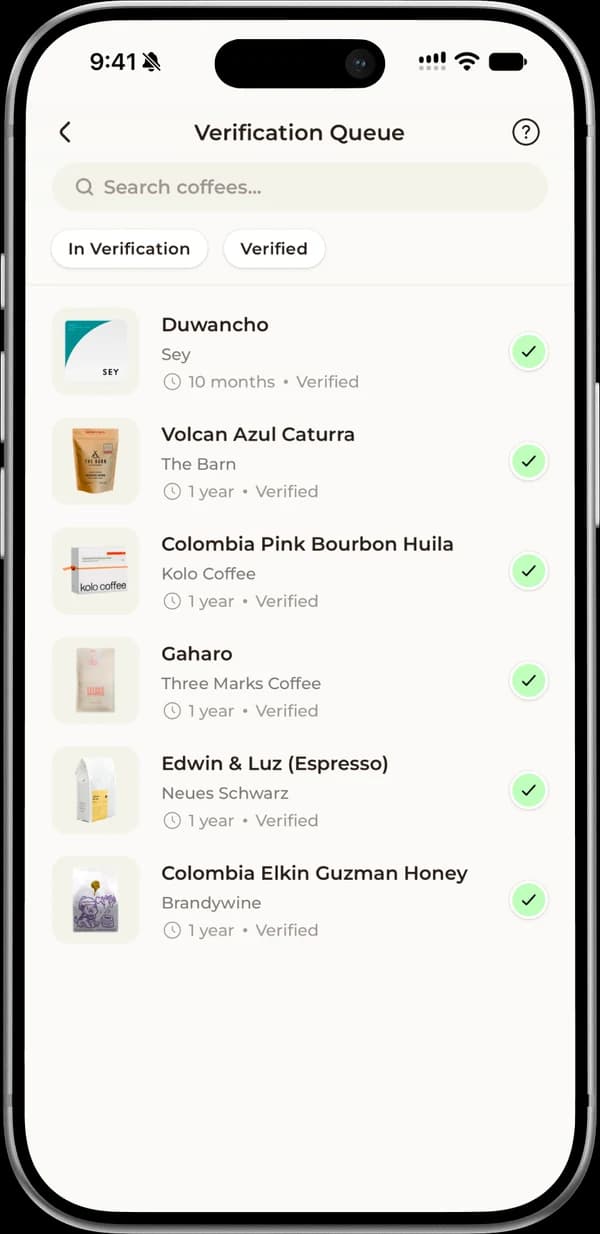
The Verification Queue, with coffees you added marked verified

Track coffees awaiting verification, edit coffees you added, and delete coffees from My Coffees.

A new verification queue shows which of the coffees you scanned or added the Coffi team is still matching. You can edit most details of the coffees you added yourself, at any time, and delete accidental adds or duplicates right from My Coffees.

  • Queue at a glance: My Coffees now shows how many of your coffees are verified or still pending.
  • New add-coffee page: Add a coffee's photo, roaster, name and origin details on one page.

  • Add from a failed scan: When a scan can't find a match, add the coffee straight from your photo.

  • The notification prompt no longer reappears right after you decline it.
  • Fixed a camera crash when returning to the app.
  • Fixed stretched images and an image-sizing crash.

1.5.2 - Patch release

Builds 2193-22077 changes

Swipe actions, match badges and sorting for scan history and batch scans, plus crash and memory fixes.

  • Sort batch scans: Sort your batch scans by most recent or by taste match.
  • Swipe to report or delete: Swipe a scan to report a wrong match or delete it, in batches and history.

  • Match badges in scan history: See each scanned coffee's taste match right in your scan history.

  • Live score updates: Match scores appear everywhere as soon as you reach 10 ratings.

  • Lower memory use, so the app is less likely to be force-closed.
  • Fixed crashes in search, the scanner and on coffees with missing images.
  • Roaster Instagram and TikTok links now open the right profile.

1.5.1 - Patch release

Builds 2185-2185

The 1.5.0 build, released again under a new version number with no changes for you.

1.5.0 - Taste Match

Builds 2132-218410 changes

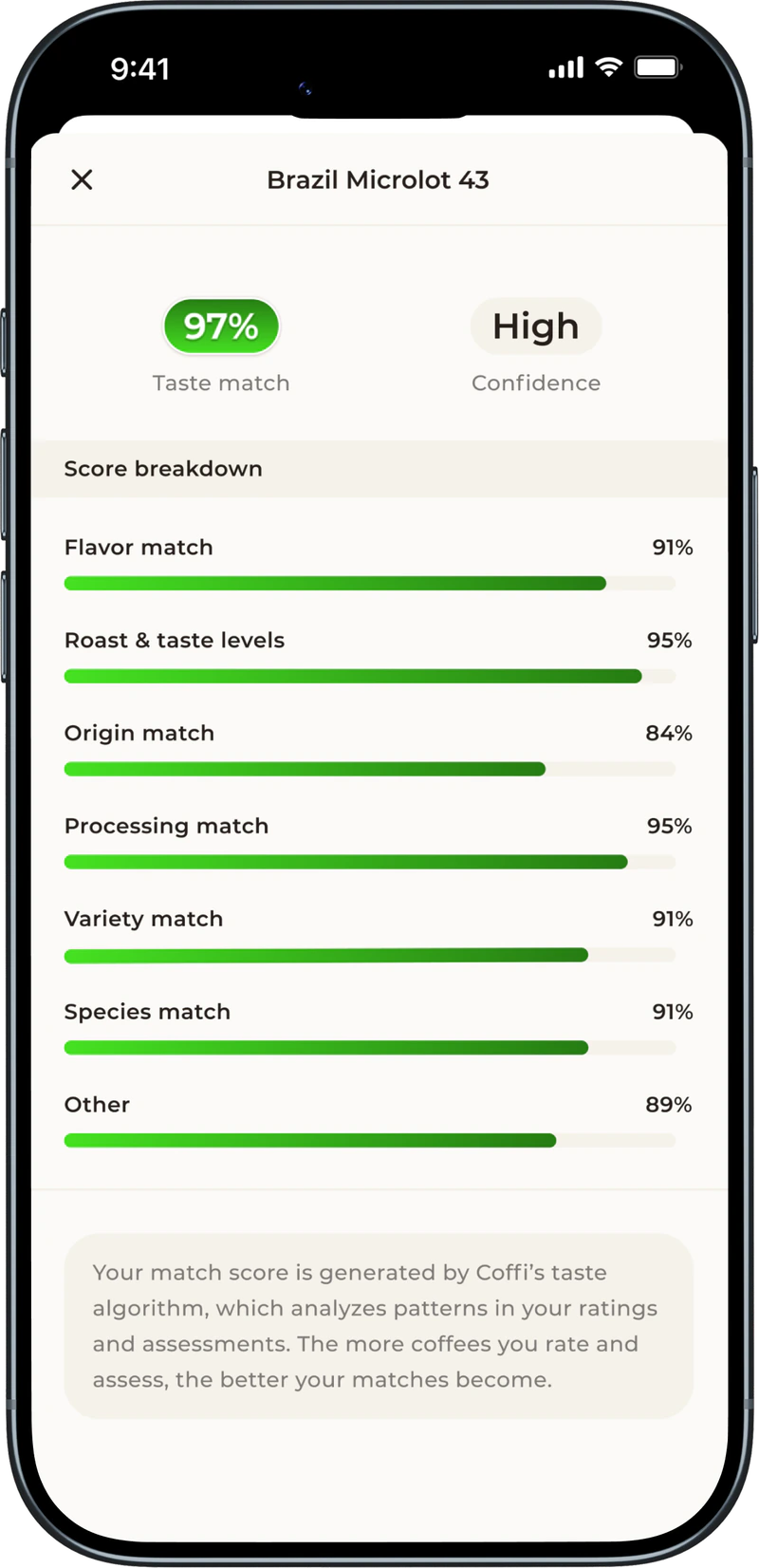
A coffee's Taste Match: a 97% match with high confidence, and the score broken down by flavor, roast, origin, processing, variety and species

Taste Match scores coffees for you, Weekly Picks recommends new ones, and the coffee page gets a redesign.

Taste Match learns from your ratings, reviews and assessments to predict which coffees you'll enjoy, and it gets more accurate the more you rate, review and assess.

With Coffi Pro, every coffee shows your personal match score from 0 to 100%, and Weekly Picks brings a fresh selection of coffees chosen for you each week, right in Discover.

  • Match on the coffee page:
    Pro
    Tap a coffee's match badge to see how its score breaks down.
  • Learning phase: Match scores unlock after your first 10 ratings, with progress shown along the way.

  • Weekly Picks screen:
    Pro
    Browse all your picks and see when the next refresh arrives.
  • Faster Discover: Each Discover section shows up as soon as it's ready.

  • Redesigned coffee page: See taste match, average rating and reviews up top, plus a quick roaster link.
  • Report data issues: Flag wrong coffee details with a pre-filled email.

  • Rating reminders: Get reminded to rate a coffee, and tap to rate it right away.

  • Fixed a crash on coffees or roasters with no images.
  • Coffees you just rated now appear in My Coffees right away.
  • The scanner camera now shuts off when you leave it, saving battery.

1.4.6 - Patch release

Builds 2128-2128

The Pro paywall may now appear once per session for non-Pro members, rather than once a week.

1.4.5 - Patch release

Builds 2126-2126

Restores ad-attribution tracking for sign-ups, a change under the hood with nothing new for you to see.

1.4.4 - Patch release

Builds 2120-2124

Housekeeping for attribution and the build: install attribution now waits until you answer the iOS tracking prompt.

1.4.3 - Patch release

Builds 2118-2118

A behind-the-scenes release that swaps the install-attribution provider, with nothing new for you to see.

1.4.2 - Share your Coffi Passport

Builds 2086-21155 changes

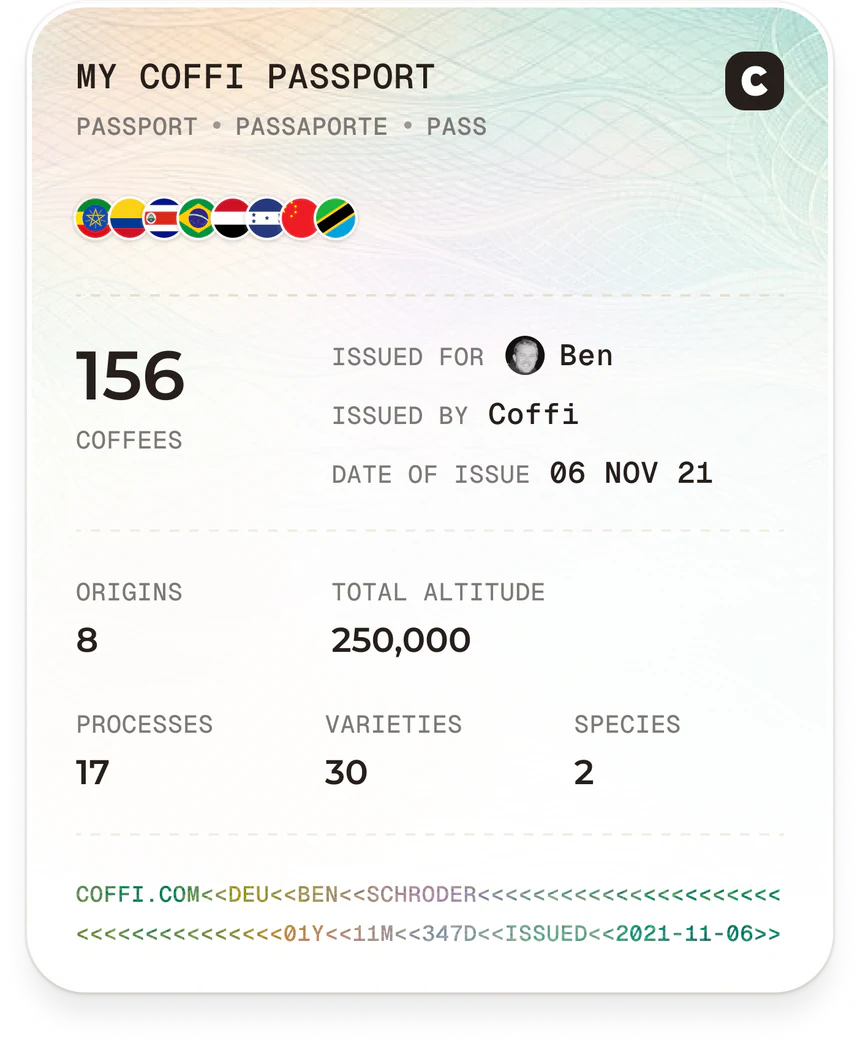
A shared Coffi Passport: 156 coffees from 8 origins, with its flags, totals and issue date

Share any part of your Coffi Passport as a designed image to Instagram Stories or anywhere else.

Pick one section of your Passport, like your origins or roasters, or the whole overview, and Coffi turns it into an image ready to post.

  • Stories & more: Post straight to Instagram Stories, send to friends or save the image.
  • Sharing on the free plan: Free users can share their all-time overview or upgrade to unlock every card.

  • Tap to unlock: Tapping a locked Pro item now opens the upgrade screen.

  • Email support: Contact support from Settings with a pre-filled email.

  • Shared images no longer show up with blank photos.

1.4.1 - Patch release

Builds 2069-20844 changes

Quicker collection management from search and inside collections, plus Passport and profile fixes.

  • Save from search: Add coffees to a collection straight from Discover search results.

  • Move between collections: Move or remove a coffee across collections from inside any collection.

  • Richer species & altitude: Species now show percentages, and your altitude extremes open the coffee.

  • Public profiles now show only collections that person owns.

1.4.0 - The Coffi Passport

Builds 1998-206813 changes

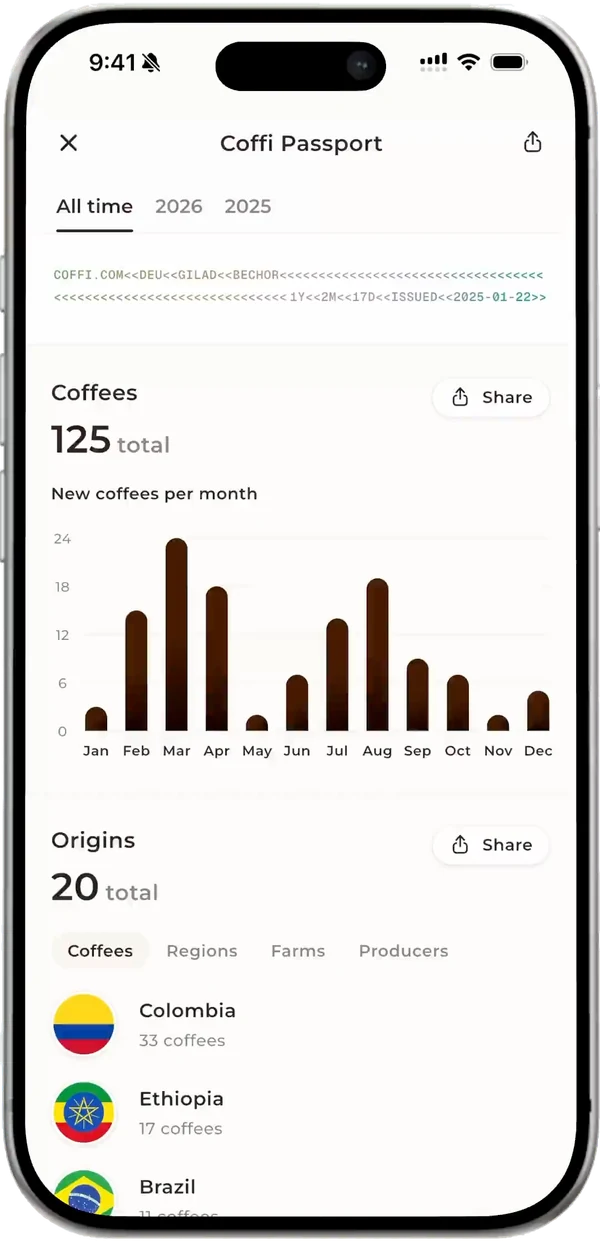
Your Coffi Passport's details: new coffees per month, and your origins by country
Your Coffi Passport: a globe of where your coffees come from, over your passport with its flags and totals

Meet the Coffi Passport, an always-on record of every coffee you've logged, with a 3D origins globe and rich stats.

Your Passport builds itself from the coffees you log, and opens from your profile. Explore them by origin, altitude, process, variety, flavor, roaster and rating, and watch it update as you rate, review and assess, with no refresh needed.

  • Origins globe: Spin a 3D globe of your coffees' origins and tap a marker to open one.
  • Year filter: Switch every section between all time and any year since you joined.
  • Coffees chart: See how many new coffees you try each month, free for everyone.
  • Origins & altitude:
    Pro
    See your top countries, regions and farms, plus how high your coffees grew.
  • Process, variety & species:
    Pro
    Break down your coffees by processing method, variety and species.
  • Flavor breakdown:
    Pro
    See which flavor notes show up most across your coffees.
  • Roasters & finished bags:
    Pro
    See the roasters you've tried, where they're based and how many bags you've finished.
  • Ratings insights:
    Pro
    See your average rating, rating spread and your highest- and lowest-rated coffees.
  • Suggest new insights: Ask for new Passport insights straight from the Passport.

  • Passport & rank cards: Open your Passport and your global rank from two new profile cards.

  • Redesigned paywall: Clearer yearly and monthly plans, a free trial, and the full Passport as Pro's top perk.

  • Links opened while the app is still starting on Android are no longer dropped.
  • Reviews opened from a link or notification now show whether you've liked them.

1.3.7 - Patch release

Builds 1976-1977

Every kind of shared Coffi link now opens the right screen in the app, including on Android, and going back from a screen a link opened no longer leaves a black screen.

1.3.6 - Patch release

Builds 1974-1974

Likes no longer flip back when a review card refreshes, and comment counts in the Friends feed stay correct after refreshing.

1.3.5 - Share your coffee journey

Builds 1957-19715 changes

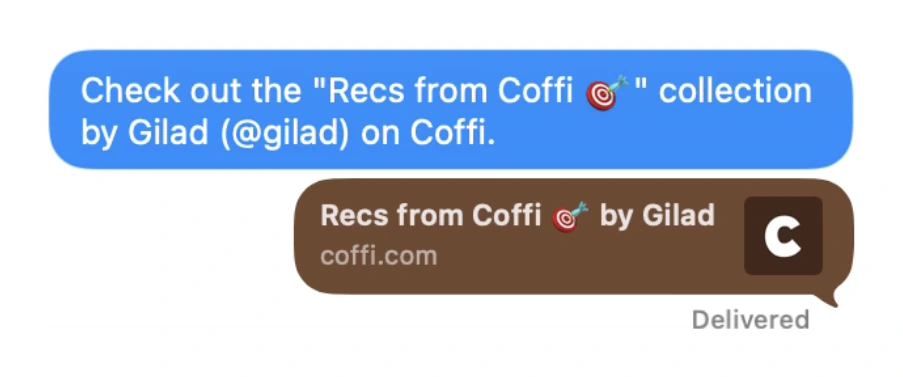
A Coffi collection shared in Messages: a link to Recs from Coffi by Gilad, with its preview

Share coffees, profiles and collections with a link, and get better scan matches from the text on the bag.

Share any coffee with a single tap, send friends straight to your Coffi profile with its link, or share a whole collection as one clean link.

  • Sharing private collections: Make a private collection public and share it in one step.

  • Pull to refresh: Pull down on My Coffees to refresh it.

  • Smarter scan matching: The app now reads the text on the bag to improve matches.
  • Faster batch scanning: Batch scans move along quicker, with no wait between items.

  • The coffee page now always shows bean species and processing method.

1.3.4 - Patch release

Builds 1941-19544 changes

A polish patch that applies the free-tier collection lock on Profile and smooths out typing and refresh.

  • Locked collections on Profile:
    Pro
    Free users now see extra collections locked on Profile too.

  • Pull to refresh: Followers and Following lists now support pull-to-refresh.

  • The cursor no longer jumps while you type a review.
  • Comment links open faster.

1.3.3 - New social features

Builds 1849-193911 changes

A review's comments: a question, a reply from its author with an @mention, and a like

Reviews become conversations, with likes, threaded comments, @mentions, Instagram Story sharing and a rebuilt Notifications inbox.

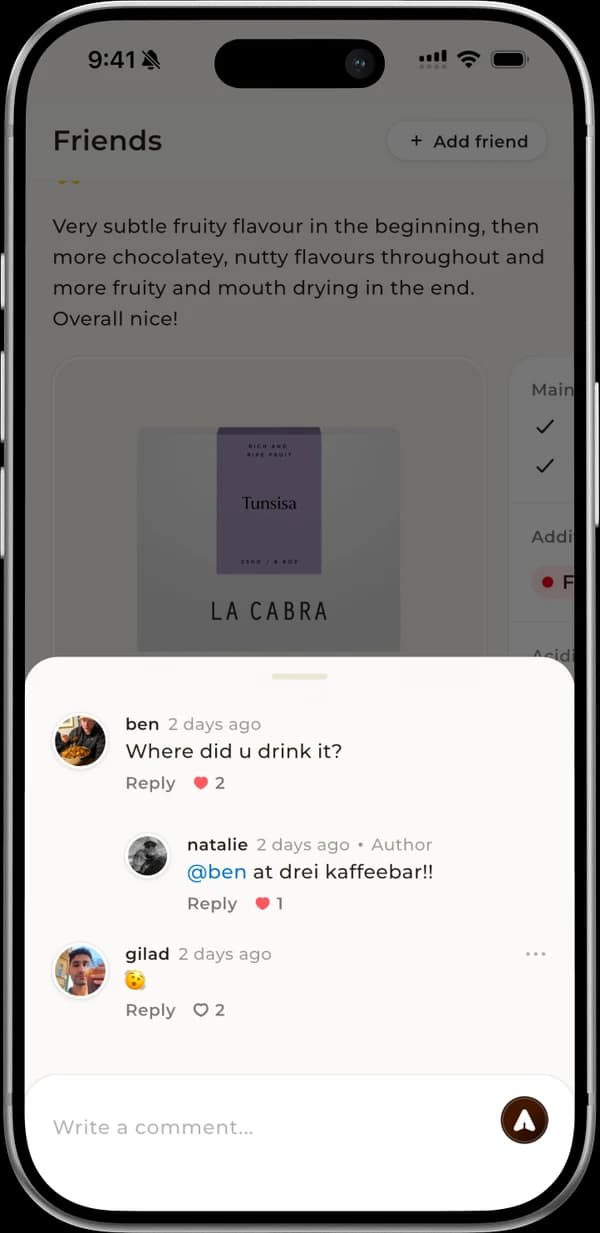
Like your friends' reviews and comment on them right from the feed. Mention someone with @ and reply directly to any comment, so conversations stay threaded.

Reviews can carry up to four photos, like your setup or the bag, and you can send a review to friends or post it to your Instagram Story. The Notifications screen now covers every one of these new interactions.

  • Double-tap to like: Double-tap any review to like it, and see who else liked it.
  • Manage comments: Like other people's comments and delete your own whenever you need to.
  • Review screen: Open a single review with its full comment thread from links and notifications.
  • Background uploads: Saving a rating returns you right away while it uploads in the background.

  • Story-card images: Shared reviews become designed images for Stories or any other app.

  • Grouped inbox: Notifications are now grouped into New, Today and Past Days.
  • Follow back from the inbox: Follow new followers right from their notification.
  • Straight to the review: Like, comment and mention notifications open the review they're about.

  • Tabs remember your place: Tabs keep their scroll position, and tapping the active tab jumps to the top.

  • Friends feed cards show coffee details again.
  • More fixes for black screens around restored sheets.

1.3.2 - Patch release

Builds 1834-18485 changes

Add photos to reviews, pick up unfinished ratings where you left off, and open the right screen from notifications.

  • Photos on reviews: Add up to four photos to a rating and view them fullscreen.
  • Rating drafts: New ratings save as you go, so you can resume later or start fresh.
  • Assess while rating: Add, view, edit or delete an assessment while writing a new rating.

  • Taps open the right screen: Tapping a notification takes you to the coffee, roaster or person it's about.

  • Reopening the app no longer leaves a black background behind old sheets.

1.3.1 - Patch release

Builds 1832-1832

Your Collections screen and profile now count only the collections you own, and Followers and Following lists load more with a Show more button.

1.3.0 - Coffi is now social

Builds 1758-182716 changes

Friends commenting on a review: where it was drunk, and a reply from its author
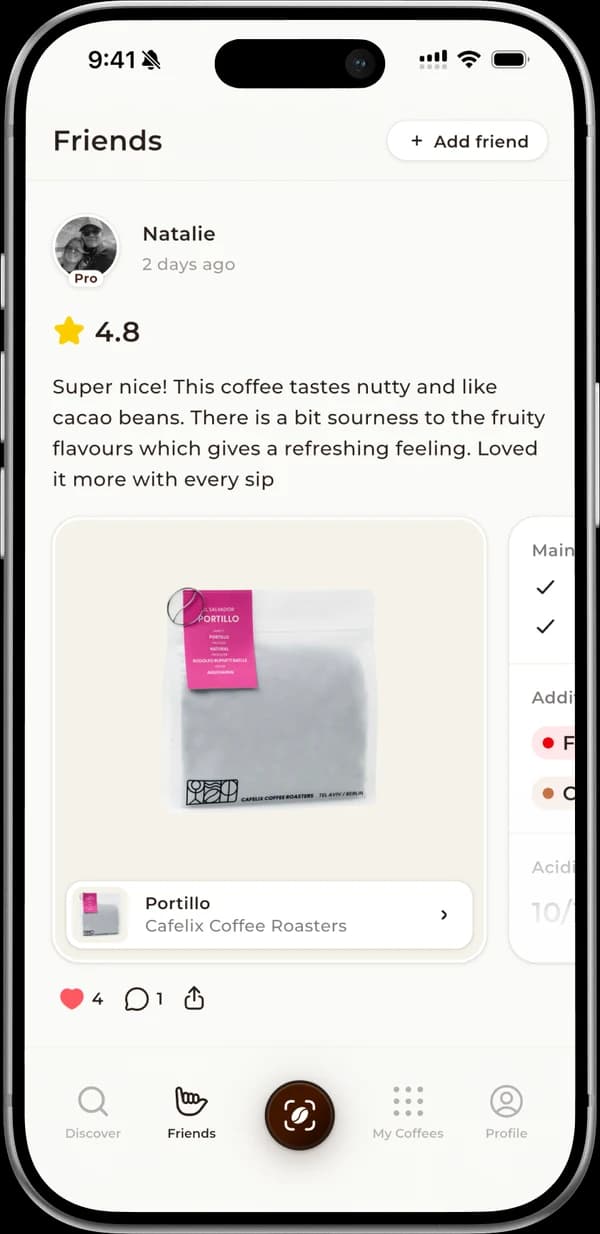
The Friends feed: a friend's 4.8 review of a coffee, with likes and comments

Coffi goes social with a Friends feed, public profiles, follows, collection privacy and invite-a-friend rewards.

Follow other coffee lovers to build your own coffee circle, and see what they're rating, reviewing and assessing in your new Friends feed. Your public profile shows off your reviews and public collections, and each collection can be public or private with one tap.

Invite friends with your link, and they get a month of Coffi Pro free when they join.

  • New four-tab bar: Discover, Friends, My Coffees and Profile each get their own tab.

  • Find friends: Search by @username or browse top community members to follow.
  • Followers & following: Tap the counts on any profile to see who follows whom.
  • Tap through to profiles: Tap a reviewer's photo anywhere to open their profile.
  • Accept an invite:
    Pro
    Open a friend's link, even before signing up, and redeem a free Pro month.
  • Track your referrals:
    Pro
    On iOS, follow your invites and claim 75% off yearly Pro after three join.

  • New profile card: See your followers, following and global rank at a glance.

  • My Coffees tab: Your coffees, ratings and notes now live in their own tab.

  • Reworked rankings: See your global rank and stats, and open any ranked user's profile.

  • Browse others' collections: Open public collections from any profile to look through them.

  • Profile privacy: Choose whether anyone or no one can see your public profile.
  • Redeem voucher codes: Enter an invite code from a roaster to unlock your special offer.

  • New social alerts: Get notified when someone follows you or accepts your invite.

  • Share a roaster: Send any roaster page to a friend with a link.

  • Public profiles now show the true review count.
  • The voucher-code sheet is no longer hidden by the keyboard.

1.2.0 - Verified roasters are here

Builds 1637-174311 changes

Verified Roasters arrive, with rich profiles, location maps and advanced filters for their coffees.

The first verified partner roasters are live, featured at the top of Discover. Their pages are richer, with their story, coffees and locations, and you can filter a verified roaster's coffees by rating, roast level, variety, country and more.

  • Verified badge explainer: Tap a roaster's verified badge to learn what it means.
  • Roaster locations: See each location on a map and get directions in your maps app.
  • Photo gallery: Open roaster and location photos full screen and zoom in.
  • All coffees view: Search a roaster's whole range and narrow it down with quick filters.
  • Faster roaster pages: Roaster pages now appear sooner.

  • Verified roasters on Discover: Verified roasters now lead the Discover tab, with a full list a tap away.

  • Archived by roaster: Coffees a roaster has retired are marked as archived, and your ratings and notes stay.

  • Clearer yearly pricing: The yearly plan now shows its full price per year.

  • Coffee and roaster links: Coffee and roaster links open in the app, even if you sign up first.

  • Sign-in and sign-up no longer jump to the loading screen partway through.
  • Roaster coffee cards no longer respond to taps before they've loaded.

1.1.3 - Patch release

Builds 1621-16293 changes

A Coffi Pro reliability update: fewer mistaken paywalls and instant unlocks, plus a new minimum iOS version.

  • Fewer paywalls for Pro: Coffi recognises your Pro status sooner, so subscribers aren't shown paywalls by mistake.
  • Instant unlock: Pro features open right after you subscribe.

  • Requires iOS 15: The iOS app now needs iOS 15 or later.

1.1.2 - Patch release

Builds 1599-16164 changes

Paywall polish, a batch-scan fix and verified badges on roaster pages.

  • Verified badge: Verified roasters now show a checkmark next to their name.

  • Paywall polish: Prices read more cleanly and the Terms and Privacy links are up to date.

  • What's new once per update: Release notes now appear once per version instead of once per build.

  • Batch scans are no longer processed twice.

1.1.1 - Patch release

Builds 1594-1596

A store re-submission of the Coffi Pro launch, with no changes in the app.

1.1.0 - Coffi Pro launch

Builds 1450-159313 changes

Coffi Pro launches with collections, batch scanning, resting reminders and more, plus brewing methods in assessments.

With Coffi Pro, your wishlist becomes as many custom collections as you like, and you can snap several bags in a row while they process in the background.

Set a resting period on any coffee and get a reminder when it's ready to brew, write as many personal notes as you like, and when a scan fails, yours jumps to the front of the matching queue.

  • Coffi Pro subscription: Subscribe monthly or yearly, with a free trial when one is available.
  • Free plan limits: Free users keep one collection and one note per coffee, and Pro unlocks the rest.
  • Pro badge: Pro members get a Pro badge on their profile and on the leaderboard.

  • Resting period tools:
    Pro
    Follow each rest with a countdown, add it to your calendar, and filter by it.
  • Resting guide: A new guide explains why beans need to rest and how long to wait.

  • Save to collections: Save a coffee to one or more collections from its page, roaster pages or Discover.
  • Manage collections: Search, rename or delete collections and remove coffees you no longer want.

  • Brewing method in assessments: Add how you brewed a coffee, including iced, as an optional assessment step.

  • How to scan guide: Quick tips in the scanner help you get a clean, recognisable shot of your bag.

  • Coffee and roaster links: Links to a coffee or roaster now open it straight in the app.

  • Your existing rating is no longer overwritten when you open the rating screen.
  • Pro status no longer carries over between accounts on a shared device.
  • Review times now show when a review was written, not when it was last edited.

1.0.1 - Patch release

Builds 1408-14454 changes

A scanner update that lets you snap several bags in a row with Batch mode.

  • Batch mode: Snap several bags in a row while Coffi matches them in the background.
  • Easier mismatch reports: Reporting a wrong match now happens in place, with a confirmation when it's done.

  • Review length counter: Reviews now show a live character counter as you write.

  • The camera preview no longer freezes when you open the batch list or while a scan is processing.

1.0.0 - Coffi is live

Builds 4-140716 changes

Coffi's founders, Ben and Gilad, together at night, in black and white

Coffi launches: scan a coffee bag to identify it, then rate, review, assess and track your coffees.

Point your camera at a coffee bag and Coffi identifies it for you. If Coffi doesn't know a coffee yet, add it yourself and use it like any other, and archive the ones you no longer track without losing their history.

Every rating, review and assessment counts toward your worldwide rank. The Coffee Value Assessment, a short guided tasting inspired by the Specialty Coffee Association, adds to your review, and roaster pages have fun facts and stories to swipe through.

  • Easy sign-in: Sign in with email, Google or Apple, then set up your profile in a few steps.
  • First steps checklist: A short checklist with tutorial videos helps you get to know Coffi.

  • Help when there's no match: Report wrong matches or add missing coffees, and the Coffi team matches failed scans.
  • Scan history: Review every scan you've made and finish any that need your input.

  • Discover and search: Browse featured coffees and roasters, or search any coffee by name or roaster.

  • Rich coffee pages: See a coffee's flavour profile, origin, reviews and roaster all in one place.

  • Roaster pages: Explore a roaster's story, ratings and full range of coffees, and search within it.

  • Slide to rate: Rate a coffee with a quick slide and add a written review if you like.

  • My Coffees: Find every coffee you've stocked, rated or noted in one searchable list.
  • Coffee wall and notes: Track the bags you have and have finished, and keep personal notes on each.

  • Save to wishlist: Bookmark coffees you want to try and find them all in one place.

  • Your profile: Edit your profile anytime, and early users get a collectible Early Adopter badge.

  • Global leaderboard: See your contributions and how you compare with the top users worldwide.

  • Push notifications: Stay up to date with push notifications, an inbox and per-topic settings.

  • Request to buy: Request a coffee from its page and the Coffi team emails you to complete the purchase.

  • iOS and Android: Coffi is available on iOS and Android, with a Scan button at the centre.